Guide
Everything you can do, in one page
Draw with one finger, erase with your palm, and bring in your second hand to conjure shapes. Here is how each piece works, plus tips for steady tracking.
Draw
- Point to drawRaise just your index finger to draw. Curl it into your palm to lift the pen — then write anything, letter by letter.
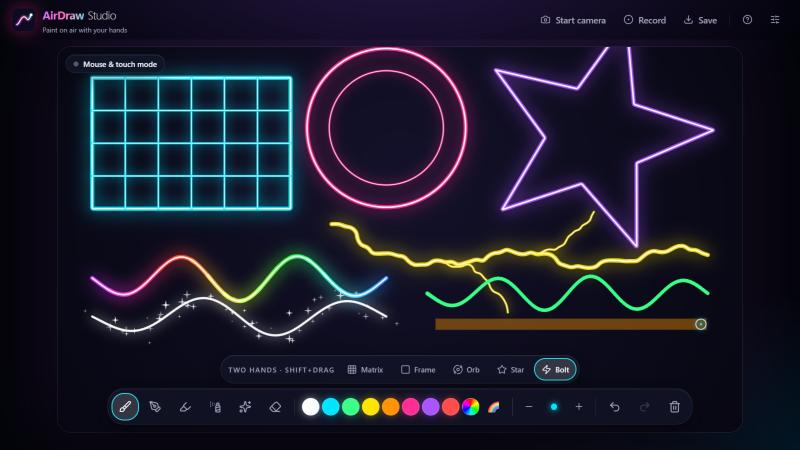
- Make it yoursPick brush, colour, size or rainbow in the toolbar. Turn on Smart shapes in Settings and rough circles, boxes, triangles and lines snap clean when you lift.
Five brushes
- 1 · NeonGlowing light-tube line
- 2 · InkSolid line that thins out as you move fast
- 3 · HighlighterWide translucent marker
- 4 · SpraySoft airbrush
- 5 · SparkleGlowing line with a trail of stars
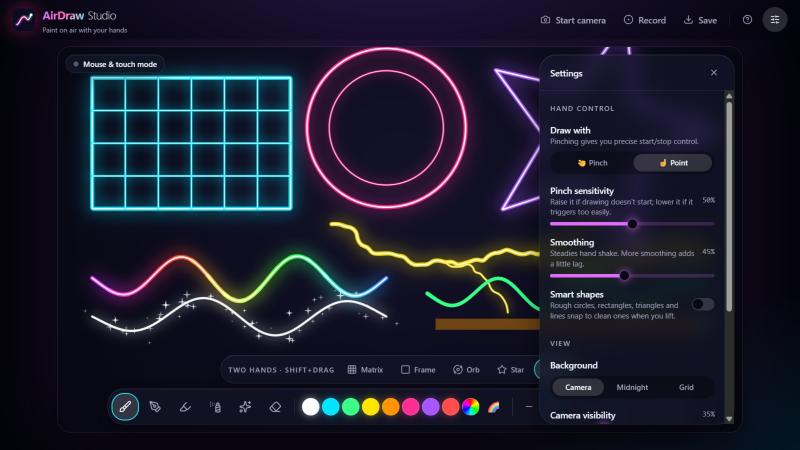
Prefer pinching? Open Settings → Draw with → Pinch. Pinch to put the pen down, release to lift it. Smart shapes and the brush list are the same in both modes.
Erase & click
- Open palm erasesSweep a flat hand over your artwork. It removes only the part you touch, not whole strokes.
- Hover to clickShow two fingers (✌️) and hold over any toolbar button until the ring fills — pointing alone would draw. Switch brushes without touching the keyboard.
- Fist pausesRest your hand whenever you like. A fist never marks the canvas.
- Undo, redo, clearEverything is undoable — even Clear and conjured shapes. Use the toolbar or Ctrl/⌘ Z.
Two-hand magic
Draw with one hand as usual. Bring in the second hand and drawing pauses: your hands become a creative instrument.
- 1Show both hands to the camera. A ghost of the chosen shape appears.
- 2Pinch thumb + index on both hands. The shape comes alive between your fingertips.
- 3Pull apart to resize. Twist to spin a star. A matrix gains rows and columns.
- 4Release a pinch to place it. It is real artwork: undo, erase, export.
Pick a shape in the bar above the toolbar
- MatrixA grid — pull apart to add rows and columns
- FrameA rectangle between your hands
- OrbA magic circle with your hands as its diameter
- StarA five-pointed star — twist your hands to spin it
- BoltA crackling bolt of lightning
No second hand handy? Hold Shift and drag with your mouse to conjure the same shapes.

Recipes to try
- Sign your nameInk brush, white, point mode. Write a letter, curl your finger to lift the pen, move on to the next.
- Quick wireframeConjure a Matrix with both hands, then drop a Frame inside it for a phone screen.
- Neon signNeon brush with Smart shapes on. Draw a circle and a star, then add rainbow text underneath.
- Lightning stormPick Bolt, choose yellow, and conjure a few at different angles on the Midnight background.
- Sticker for chatTurn on Transparent PNG in Settings, draw, then Save for a cut-out you can paste anywhere.
- Time-lapse reelPress Record, draw for a minute, press Stop. You get a video of the canvas.
Get set up
- Light your handsFace a window or lamp. Even, front-facing light beats a bright window behind you.
- Arm's lengthKeep your hand about an arm's length from the camera, fully in frame, palm toward it.
- Tune itSettings has Smoothing for a shaky hand and Pinch sensitivity if pinches miss or trigger too easily.
- 100% privateHand tracking runs on your device. Video is never uploaded, and your drawing is saved only in this browser.
- No camera? No problemMouse, touch and pen all draw. Right-click drag erases; Shift-drag conjures shapes.
- Keep your artSave a PNG (transparent if you like) or record a video of the canvas from the top bar.
Keyboard & mouse shortcuts
- Choose brush
- 1 – 5
- Eraser
- E
- Toggle rainbow
- R
- Brush size
- [ ]
- Undo
- Ctrl/⌘ Z
- Redo
- Ctrl/⌘ Shift Z
- Save PNG
- Ctrl/⌘ S
- Erase with mouse
- Right-click drag
- Conjure the chosen shape
- Shift + drag
Ready to draw on air?
It takes one click. No account, no install, and your video stays on your device.
Open the studio